 Farmy
FarmyExact CS counter for League of Legends
Your CS is the cleanest number to measure how well you farm – but the value most tools show you is rounded. Here is why, and how Farmy shows the exact count while you play.
Why most tools show CS in steps of 10
Overlays and companion apps usually get their numbers from Riot's Live Client Data API, a small local interface the game opens while a match is running. It is the official way to read in-game data – but its creep score only moves in steps of 10. If you have 147 CS, the API still says 140 until you reach 150.
For a quick glance that is fine. For practising last hits, comparing yourself to your lane opponent or checking whether you hit your CS/min goal, a value that is up to 9 CS off is not.
How Farmy gets the exact number
The number in the top right of your HUD is always exact, so the overlay reads it from there: every 2.5 seconds it looks at that small screen region and recognises the digits locally with its own digit recognition (Tesseract as a fallback). Nothing is sent anywhere, and the game itself is never touched.
If the number can't be read – for example because the HUD is covered – the panel falls back to Riot's value and marks it with a plus: 140+. That way you always know whether you are looking at the exact count.
Resolution and HUD scale are detected automatically, also if you change the HUD scale during a game. If a value is ever read wrong, the stats window has a Check recognition button that shows exactly which area was read.
What the panel shows around your CS
| Value | What it tells you |
|---|---|
| CS and CS/min | Exact creep score and your farming rate for the current game. |
| CS diff | How far ahead or behind you are compared to your lane opponent. |
| XP to next level | The XP you still need, translated into melee and caster minions and waves – useful for timing level 2, 3 and 6 spikes. |
| Gold to next item | Gold still missing for the next item of your build, with a RECALL alert once you can afford it. |
Track your CS/min over many games
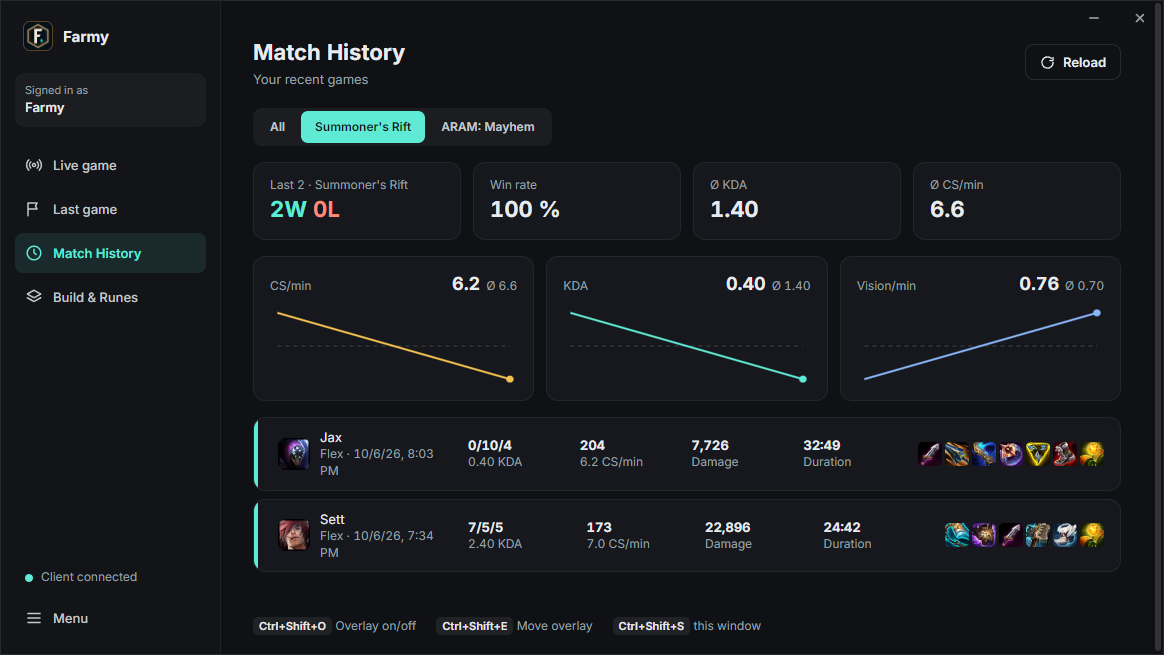
The stats window keeps your match history with trend charts for CS/min, KDA and vision, split by game mode – CS on Summoner's Rift and in ARAM are not comparable, so they are never mixed. You see your last games, your average and whether the line goes up.
Is reading CS from the screen allowed?
The overlay only reads what you already see on your own screen and shows it in a different place. It does not read the game's memory and sends no inputs. Read more in Are LoL overlays allowed?
Get the exact CS in your next game
Free, open source, no account and no ads. Windows 10 and 11.